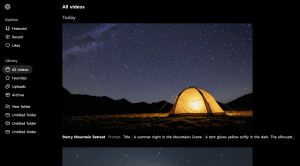
Sora로 자연스럽고 왜곡 없이 5초짜리 영상을 만들기 위해서는 구체적이고 논리적인 영상 스크립트 작성이 필수입니다. AI 기반 생성 모델이 현실적이고 매끄러운 결과물을 만들어낼 수 있도록 몇 가지 핵심 구성 요소를 고려해야 합니다.
1. Sora 영상 스크립트 작성법
Sora는 **텍스트 프롬프트(스크립트)**를 기반으로 영상을 생성하므로, 구체적이고 정확한 설명이 필요합니다. 영상 스크립트는 다음과 같은 요소로 구성하는 것이 좋습니다.
📌 기본적인 스크립트 구조
1️⃣ 타이틀 (Title)
2️⃣ 장면 설명 (Scene Description)
- 프레임 크기 (Frame Size)
- 카메라 움직임 (Camera Movement)
- 조명 (Lighting)
- 분위기 (Mood) 3️⃣ 동작 설명 (Action) 4️⃣ 마무리 및 페이드 아웃 (Closing Scene & Fade Out)
2. Sora에 적합한 스크립트 작성 가이드
✅ (1) 프레임 크기와 카메라 워크 설정
- 고정된 프레임 (Static Shot) → AI가 불필요한 왜곡을 하지 않도록 가장 자연스럽게 구현됨.
- 서서히 움직이는 카메라 (Slow Pan / Tilt / Zoom-in) → 급격한 이동을 피하고 부드러운 모션을 추천.
- 와이드샷 (Wide Shot) → 배경과 주인공을 함께 담을 때 효과적.
✅ (2) 자연스러운 AI 영상 생성 팁
1️⃣ 정확한 시간 단위 사용
- “A glowing tent under a starry night for 5 seconds” (❌ 모호함)
- “A softly glowing camping tent under a starry night, captured in a wide static shot for exactly 5 seconds” (✅ 명확함)
2️⃣ 비현실적인 움직임 지양
- AI는 과장된 동작을 만들기 쉬움 → “Camera quickly circles around the tent” 같은 지시어는 왜곡 위험이 있음.
- 대신 부드럽고 현실적인 동작을 제시: “The camera gently tilts upward to reveal the Milky Way.”
3️⃣ 조명과 색감 명확히 지정
- “A warm, golden light flickers from the tent, casting a soft glow on the grass.”
- AI가 색감을 정확하게 잡을 수 있도록 ‘warm’ / ‘cool’ 같은 수식어 활용.
4️⃣ 배경과 전경 구분 명확히 하기
- “Distant mountains are visible in the background, silhouetted against the faint blue horizon.”
- 명확한 공간감 부여로 AI가 오브젝트를 잘 배치하게 유도.
3. 최적화된 5초 영상 스크립트 예시 (Sora Friendly)
📜 English Version
Title: Night Under the Stars
[Scene Description]
- A wide-angle shot captures a small glowing tent in the mountains at night.
- The camera is static to maintain a natural perspective.
- The Milky Way stretches across the night sky with thousands of stars visible.
- A gentle cool breeze moves the grass slightly.
[Action]
- The tent light softly flickers as if someone is inside.
- A campfire in the distance glows faintly, adding depth.
- The camera slowly tilts upward to focus on the stars for the final 2 seconds.
[Closing Scene]
- The screen fades to black as a soft wind sound fades out.
📜 한국어 버전
제목: 별빛 아래의 밤
[장면 설명]
- 와이드 샷, 산속의 작은 텐트가 부드럽게 빛난다.
- 카메라는 고정된 상태로 자연스러운 구도를 유지한다.
- 은하수가 밤하늘에 길게 펼쳐지며, 수천 개의 별이 반짝인다.
- 잔잔한 바람이 풀을 가볍게 흔든다.
[동작]
- 텐트 안의 빛이 부드럽게 깜빡이며 누군가 있는 듯한 느낌을 준다.
- 멀리 있는 캠프파이어가 희미하게 빛나며, 장면에 깊이를 더한다.
- 카메라가 천천히 위로 이동하며 마지막 2초 동안 별들을 강조한다.
[마무리]
- 화면이 점점 어두워지며 잔잔한 바람 소리가 사라진다.
4. 추가적인 세부 요소 설정 방법
| 요소 | 설명 및 예시 |
|---|
| 프레임 크기 | “A wide-angle static shot of a mountain campsite at night.” |
| 카메라 워크 | “The camera gently tilts up to reveal the Milky Way.” |
| 조명 효과 | “The tent glows softly, contrasting with the dark sky.” |
| 배경 묘사 | “Distant mountains fade into the horizon.” |
| 사운드 디자인 | “A soft breeze rustles through the grass.” |
5. 결론
Sora를 이용한 5초 영상 제작에서 구체적인 설명, 자연스러운 동작, 현실적인 카메라 워크가 핵심입니다.
✔ 고정된 프레임 사용
✔ 부드러운 움직임만 추가
✔ 조명과 색감을 명확히 지정
✔ 시간을 정확하게 설정